 OFFLINE AI NPC
Beginner's guide
Start here if you have not installed a Unity package with external dependencies before. The first goal is one typed question and one text answer in Hello NPC. After that, add voice, microphone input or your own character, then make a player build. Download and setup time depend on your connection, hardware and the features you choose.
After installation: follow the first text dialogue steps in one setup window.
Choose a speech setup for your game
Start with typed dialogue. Add Whisper when players need a microphone, then choose a ready voice:
| Your priority | Start with |
|---|---|
| A quick reply and a suitable voice for your language | Piper with that voice's .onnx / .onnx.json pair |
| One voice engine across several supported languages | Qwen3-TTS with a named CustomVoice speaker |
| No spoken replies | Keep text dialogue; speech output is optional |
The built-in Qwen speech presets use the 0.6B CustomVoice Q4 talker and Q8 codec. New Qwen engine components use the bundled CPU DLL with External server URL and Style empty, and the existing 1.5-second lead buffer. Serena (serena) is the default for every built-in Qwen language and preset. You can choose another of the nine ready speakers; creating a voice from a description (VoiceDesign) is not part of this version. Delivery instructions require a separately checked 1.7B CustomVoice setup. Check the language, voice terms and response time on your players' hardware; see Languages, Hardware tiers and Licensing.
Model Manager downloads the speech model files. The package includes a Windows x64 CPU Qwen native DLL; leave External server URL empty to use it. The ordinary Qwen route needs no manually started HTTP server, executable or compiler setup. Keep an existing working Piper route. See the native speech setup and Licensing.
0. What this is, in one paragraph
With the default local configuration, your character talks. The language model, the speech recognition and the speech synthesis all run on the player's own machine — no cloud, no API keys, no per-token bill, no telemetry, and it works with the network cable pulled out. For text dialogue you install a model runner, one model file and this plugin. Voice and microphone input add their own optional engines and files. One editor-only exception is yours to choose: the optional MCP server hands project data to the coding agent you connect, and a cloud-based agent sends it on to its provider — see Agent tools.
First milestone: compatible LLM for Unity → Set up first dialogue → one model → Play → a typed question and a text answer. Voice and microphone input are optional next steps.
1. Before you start
| Unity | 6000.5.7f1 is what this is developed and tested on. 2022.3 LTS or newer should work, but only 6000.5 is verified |
| Render pipeline | any for the runtime, which references no rendering package. The samples are made in URP: World Aware's five props use URP's Lit material, and outside URP the scene's Pipeline Material Fallback object gives them the running pipeline's default material instead of magenta. Built-in and HDRP are not verified |
| Platform | Windows x64 CPU is the bundled Qwen target. See the speech setup for its required CPU instructions. macOS/Linux native libraries are not included. Mobile, web and consoles are not supported by this package. Linux and macOS are not verified. |
| Disk | 10 GB free is comfortable |
| Graphics | Choose a model for the available RAM/VRAM and the memory your game needs. First dialogue shows catalog options under the current hardware policy; see Hardware tiers |
| Internet | needed for downloads; the configured local engines can run offline. A deliberately selected remote endpoint needs its own connection |
If any of those are a problem, read Is this for your game? before installing the dependencies or downloading large files.
2. Make a project
New project, any template. Nothing here depends on which.
You can also use an existing project. Importing the package adds its assets; opening the sample may ask you to save the current scene. Setup changes and build inclusion are explicit actions. Keep your existing scene and model/voice bindings when adapting the sample.
3. Install LLM for Unity — required
This is the thing that actually runs the language model. Without it your character cannot form a sentence.
- Package id:
ai.undream.llm, version 3.0.3 or newer - Free, and not bundled here — it is somebody else's package under its own licence, and freezing a copy inside this one would pin you to whatever version shipped that day
- Install it the way its own documentation says
How you know it worked: Window ▸ Package Manager lists LLM for Unity.
If Unity was already open, it may take one recompile before this plugin notices. You do not need to restart — Tools ▸ Offline AI NPC ▸ Advanced ▸ Re-check LLMUnity installation forces the check.
4. Import Offline AI NPC
Import the package. In Welcome, choose Set up first dialogue. You can reopen Welcome with Tools ▸ Offline AI NPC ▸ Welcome, or go directly to Tools ▸ Offline AI NPC ▸ Set up first dialogue.
5. Set up the first text dialogue
- In First dialogue, if Hello NPC in the scene is empty, click Open Hello NPC sample. Otherwise keep or select the character you want to configure.
- Click Choose this model. If its file is missing, Model Manager opens for that model. Download it there, then click Return to first dialogue.
- Click Preview changes, read the proposed assignment, then Apply to this Hello NPC. You can restore the previous assignment with Unity Undo.
- Save the scene, press Play and wait for startup. Type a question, press Enter and read the answer in the subtitle.
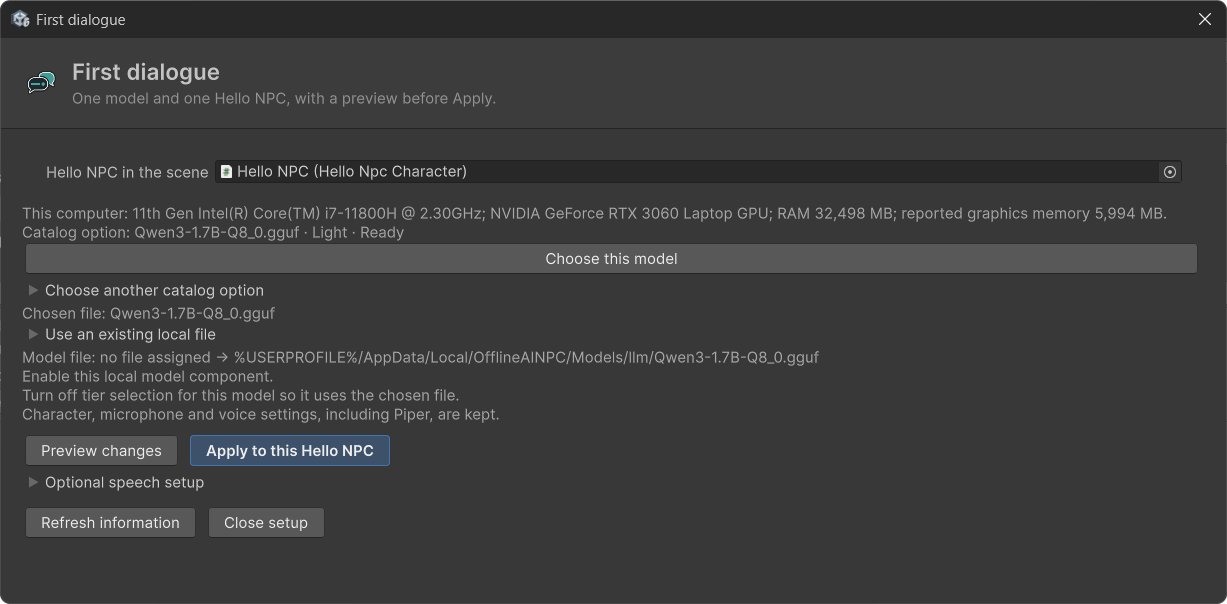
Already have a GGUF? Expand Use an existing local file and select it. To import a file, click Open Model Manager; see the own-GGUF steps.
Choose another catalog option lets you filter the model catalog by language and configuration size. The character's dialogue language is set in its persona settings; see Languages.
Start with text. Optional speech setup and the later voice/microphone sections can wait until this works. For distribution, check Licensing; advanced tier startup is in Hardware tiers.
6. Check the text setup
If the model does not start, open Tools ▸ Offline AI NPC ▸ Check my setup with Hello NPC open. Resolve the LLM dependency, selected model and scene-reference items for text dialogue.
Voice, codec and speech-output items belong to optional audio. See Getting started for more detailed setup help.
7. Your first typed conversation
If it is not already open, click Open Hello NPC sample in Welcome and save the current scene if prompted. It opens the already-wired Samples/HelloNpc/HelloNpc.unity. Press Play and wait for startup to finish. Type a question into the text box, press Enter and read the answer in the subtitle. If the model is unavailable or another turn is busy, the question stays in the input field; submit it again after resolving the message. It is not queued automatically. No microphone or ready speech engine is required for this first typed turn. A voice warning points to optional audio setup.
A healthy default tier start prints these lines. Learn to recognise them:
[OfflineAINPC] Hardware: NVIDIA GeForce RTX 3060 Laptop GPU (5996 MB VRAM, discrete), ...
[OfflineAINPC] Tier resolved: Standard — 3996 MB VRAM free after a 2000 MB game reserve
[OfflineAINPC] Running qwen3-4b-q4km at tier Standard with 36 GPU layers
[OfflineAINPC] Startup verdict: tier Standard — ...; model qwen3-4b-q4km, 36 GPU layers
For the tier route, the startup verdict summarizes the selected tier and model. It does not prove voice readiness or replace asking the first typed question. If text never arrives, inspect the Console and LLM/model setup rows, then Troubleshooting. The own-GGUF route disables its linked TierBootstrap; use the assigned LLM's startup diagnostics rather than expecting a tier verdict.
For Qwen3-TTS's ordinary DLL route, look for Native CPU ready in the Console; Piper has its own engine diagnostics. An explicitly configured external server has separate readiness diagnostics. Neither speech engine is required for text dialogue.
Startup and the first reply can take longer than later turns, including while a prompt cache is being filled. This is a possible cause of delay, not a guarantee that an unresponsive scene is healthy. Check the startup verdict for tier startup, or the assigned LLM startup for the own-GGUF route, plus the Console and setup report.
Normal, or broken?
These behaviours can be expected in the stated conditions. Use the setup report and Console to distinguish them from a failed or still-running startup:
| What you see | |
|---|---|
| Subtitle appears, no sound, and no voice configured | normal on the text-only path; add audio afterwards if wanted |
| The first reply is slower than later turns | prompt-cache setup can contribute; check startup diagnostics if no answer arrives |
| The same question gets a different answer each time | normal — it is a model, not a dialogue tree |
| The character will not repeat an authored line word for word | normal — author those lines yourself and use the model between them |
NPCMemory has no replay | normal until you assign NPCMemory.Store; the agent's chat history is separate |
A configured NPCMemory replay drops old turns | normal — its window is the last ~20 turns per character |
| The mouth does not move, the character does not walk anywhere | normal — the plugin drives none of that |
| The character invents something in the room | wire Perception to supply nearby context; this does not guarantee factual free-form prose |
| The editor seems unresponsive on the first Play | loading may be involved; inspect the Console and model startup instead of assuming every stall is normal |
| Some turns are much slower than others | First and later turns can differ. See Limitations for causes of delay and checks. |
And these are not — each has a page that names the cause:
| What you see | |
|---|---|
| Audio enabled, subtitle appears, no sound | broken speech setup — check the engine and paired voice files (Troubleshooting) |
| The character answers in the wrong language | Check the language directive and the selected model. |
| Replies run on for paragraphs | broken configuration — the token ceiling and sentence limit, not the wording of the prompt |
| No text answer and no startup verdict | check the LLM dependency, model and references before adding speech |
| Push-to-talk sends things you never said | Check the microphone, recognition language and model, and the utterance-gate settings. The gate filters known cases; it cannot prevent every transcription error. |
8. Optional: add a voice
The package includes the Windows x64 CPU Qwen speech library. Its target CPU must support AVX2, BMI2, FMA, F16C and SSE4.2. macOS and Linux libraries are not included.
- In Tools → Offline AI NPC → Model Manager, download the 0.6B CustomVoice Q4 talker and Q8 codec under Voices and speech models (about 0.9 GB together).
- Use the scene's Qwen3-TTS Engine through TTS Engine Manager and its language binding. The sample supplies this wiring; a custom character must select that engine.
- Leave External server URL and Style empty. Use
serenain Default voice to keep the same voice across languages. A character'sSpeechRequestor Speaker voices entry can override it. Set the language separately; choosing a voice does not translate the text. - In Play, type a short prompt and check the reply's subtitle and speech in the chosen language. Repeat this check in your built Windows player with the model files available.
The default route loads the DLL in Unity and streams PCM to the existing speech session. It does not start tts-server.exe. The native profile is CPU-only with eight threads. StopAsync waits for native generation and worker settlement before releasing the context. Cancellation requests cooperative cancellation; it is not an instant-stop guarantee.
A separately launched server and External server URL / AttachTo(url) are optional advanced alternatives. Keep that server's own model, backend, version and distribution requirements separate.
For a new Piper setup, put piper.exe for Windows and its companion files in Assets/StreamingAssets/piper/, and the name.onnx / name.onnx.json pair in Assets/StreamingAssets/piper/voices/. Other platforms remain unverified. Preserve existing working configurations and custom paths.
Piper remains supported alongside Qwen3-TTS. Keep both files, name.onnx and name.onnx.json; an incomplete pair is refused with a diagnostic. Model Manager's Import file copies a local pair while preserving the originals and existing destination files. The imported pair goes into Model Manager's ModelsRoot; this does not install the engine or connect the built-in Piper driver to that voice. Copying and verification show inline background progress; Cancel import requests safe cleanup. See Languages and Troubleshooting.
Run Check my setup again and fix the speech rows. Ask another typed question and check both the subtitle and audio. File presence does not prove native engine startup.
9. Optional: add microphone input
This is speech input: the player speaking instead of typing. Add it after the typed path works; skip it if you do not need a microphone.
- Install whisper.unity: Window ▸ Package Manager ▸ + ▸ Install package from git URL, and paste:
`` https://github.com/Macoron/whisper.unity.git?path=/Packages/com.whisper.unity ``
- In the Model Manager, open Speech recognition and download the Whisper model your preset names —
ggml-tiny.en.binorggml-base.en.binfor English on Light and Standard, the multilingualggml-base.binorggml-small.binotherwise. An.enmodel recognizes English only. - Select the Hello NPC character and add two components: **Add Component ▸ Offline AI NPC ▸ Push To Talk and Add Component ▸ Offline AI NPC ▸ Whisper Speech Recognition**. For runtime English/Russian switching, download a multilingual model such as
ggml-small.binand set Model File Name to it before entering Play. The loaded model stays in use for the session; a Language Definition's STT model id does not replace it. - Press Play, click outside the text box, hold V, speak and release. What it heard goes to the character as if typed; the screen says when a press was not sent, and why.
A missing dependency is never a compile error here. Without whisper.unity the Whisper Speech Recognition component is compiled out; Push To Talk stays, and with no recognizer beside it every press is reported as not sent. Your own recognizer can implement ISttEngine instead. Details: Getting started.
10. What is in the plugin, and what each part is for
Everything below ships in the package. You will not need all of it on day one — most projects start with dialogue and add the rest when they meet the problem it solves. This section exists so that you know what is already there before you build it yourself.
The runtime, by area
| Area | What it is for | The problem it solves |
|---|---|---|
| Core | languages, presets, sampling, the streaming reply parser, logging | A model answering in the wrong language, or a reply arriving as tokens when speech needs sentences |
| Speech ▸ TTS | the engine interface, the Qwen3-TTS engine (native DLL or an optional external HTTP URL), the Piper driver and process pool, voice routing, the streaming speech session | Turning a reply into audio while it is still being generated, instead of after |
| Speech ▸ STT | Push To Talk, the recognizer interface, shared microphone loop, push-to-talk recorder, the utterance gate | Whisper inventing sentences out of silence — see below, it matters |
| State | axes, bands, traits, mood presentation, serialisation | A character whose mood and relationships change, and who reads differently because of it |
| Actions | the verb schema, parser, dispatcher, targets, one-shot repair | The character DOING things, not only saying them — and doing only what you allowed |
| Perception | points of interest, weighted queries, snapshots, phrasing | The character knowing what is actually around, rather than being told to pretend |
| Memory | a small conversation window over storage you supply | The character remembering the last few turns without you inventing a format |
| Hardware | probe, tiers, the cascade, model catalog | Deciding at startup what this machine can carry, and picking a model to match |
| Models | gguf reading, asset states, storage paths | Checking file evidence before loading; native compatibility and startup remain separate |
| Diagnostics | the checks behind the setup window | Finding a broken setup at edit time rather than in a playtest |
| Verification | latency measurement, prompt snapshots, live checks | Proving it works, with numbers you produced yourself |
| Integrations | the LLMUnity grammar binding; Whisper Speech Recognition | Constraining the model's output to your action schema; recognizing the player's speech with whisper.unity |
Parts worth knowing about early
The utterance gate (UtteranceGate). Whisper hallucinates confidently on silence -- "Thank you for watching", "Subtitles by …", a lone full stop — because it was trained on video with end cards. A push-to-talk key brushed by accident therefore looks exactly like a player speaking. The danger is not a stray subtitle: if your game listens for a word as a command, an invented one triggers it, and a key brushed in passing sends the player somewhere they never asked to go. The gate judges the audio first and the text second, and every rejection says which one it was.
Action repair (ActionRepair). When the model returns a malformed action, one retry is allowed — and it asks for the action alone, never the reply again. By the time anyone knows the action was bad the speech has already been spoken, and regenerating it would make the character say the same thing twice.
Traits versus state (TraitPreset versus StateAxes). Traits never move: they are why two characters with identical axes behave differently — the shy one starts lower and warms slowly. State moves. Mood is deliberately not persisted, because a feeling that outlives the session is not a feeling, it is a trait.
Perception weights (PerceptionWeights). Serialized data, never constants. The right balance of attention for a cluttered room is not the right balance for an open field, and that is a designer's call rather than the plugin's.
The language directive (LanguageDirective). The plugin's own contribution to your system prompt: answer in THIS language, and keep it about this long. Both sentences are written in the language they are asking for — an instruction the model cannot read is not an instruction. Your dialogue code appends it: LanguageDirective.For(LanguageRuntime.Current) returns what the language definition authors, and nothing when it authors neither sentence. Hello NPC speaks the language of its own system prompt and does not add it.
Preset choice (PresetCatalog). Your entry outranks an official one for the same slot; otherwise the exact tier wins, then the closest lighter tier — because running something smaller beats running nothing.
The editor windows
All under Tools ▸ Offline AI NPC.
| Window | What it answers |
|---|---|
| Welcome | Start with Set up first dialogue; links to setup, samples and documentation. |
| First dialogue | Choose one model, prepare its file, then preview and apply its assignment to Hello NPC. |
| Model Manager | "Which model, and is it really here?" Tier, languages and licence for catalog rows, downloads checked by size and header (and by hash when the preset carries one), and control over what enters a build |
| Presets | "Which model and voice are recommended for this language and tier?" This does not select the scene's active model |
| Check my setup | "Is anything wrong before I press Play?" Real checks, each failure saying what to do |
| Prompt debugger | "Why did the character say that?" What the model was actually told. For a local product this is the only way to answer it |
| Live verification | "Does it actually speak?" Runs a whole turn — prompt, model, voice — and plays it; it generates before it voices, so Hello NPC and most characters need Play mode, and outside it the window says why it refuses. A language is marked verified only when you answer Yes, record it to "was the reply spoken in this language?". Static checks can say a configuration is valid, never that it works |
| Agent tools (MCP) | "Can my coding agent test this character with me?" An MCP server inside the editor, off until you switch it on: Claude Code, Cursor or Codex can read what a character was told, run a real turn, look at state, memory and perception, and mark objects to be noticed. See Agent tools |
Every item in the menu
Tools ▸ Offline AI NPC, top to bottom — the windows first, everything else under Advanced:
| Item | What it does |
|---|---|
| Welcome, Set up first dialogue, Model Manager, Presets, Check my setup, Live verification | the windows above, in the order you first need them |
| Prompt debugger, Agent tools (MCP) | the windows above; — start the server and — stop the server switch MCP without opening its window |
| Advanced ▸ Check my setup (log to console) | the same report as text in the Console — paste it into a support request |
| Advanced ▸ Live verification — verify everything (console) | runs every character that follows the project language through each language and prints what played; a character that answers in its persona's language, such as Hello NPC, is listed as skipped — verify it in the window. It records nothing as verified and skips a language without a test line. Chosen again during a run, it offers to stop it |
| Advanced ▸ Validate model references | lists references in scenes, prefabs and assets to model files that are not on disk — the same check that can stop a build |
| Advanced ▸ Check for unaddressable scripts | finds a MonoBehaviour or ScriptableObject class in a file with another name: Unity lets you add such a component to a scene, and it never runs |
| Advanced ▸ Re-check LLMUnity installation | looks for LLM for Unity again and sets or clears LLMUNITY_PRESENT |
| Advanced ▸ Reset to the embedded catalog | puts the official presets back to the ones in the package; your own presets are kept |
| Advanced ▸ Show welcome again after the next reload | Welcome opens by itself once more |
| Advanced ▸ Logging ▸ Verbose logging (AINPC_DEBUG) | adds or removes the AINPC_DEBUG symbol and recompiles, so debug lines exist at all. For a log for support, turn it on and set Minimum level ▸ Debug below |
| Advanced ▸ Logging ▸ Minimum level ▸ Debug … Silent | filters the plugin's console lines while you work, in Play mode too; a shipped game sets Log.MinimumLevel itself |
| Advanced ▸ Speak one line (Piper) ▸ … | says one fixed sentence through Piper, with no language model and no Play mode. It needs Piper and the named voice installed; the Russian item uses the voice the Russian language definition names, so Russian has to be set up for Piper |
What the plugin deliberately does not do
Knowing these saves you looking for them:
- Qwen speech includes its Windows x64 CPU native DLL. Model files are downloaded separately. Piper is still an external program you install; preserve its working executable, voice/config pair and binding.
11. Your own character
Start from the canonical Samples/HelloNpc/HelloNpcCharacter.cs after the sample answers. It contains the real LLMUnity call, the check that refuses a turn while another runs, action handling and cleanup. Preserve its public Say(string) entry point and serialized references when adapting an existing scene.
The following is a teaching outline, not a copyable controller or a model backend:
typed question -> one admitted turn -> streamed LLM reply
              -> local parser -> local speech session -> subtitle (+ optional audio)
completion    -> complete parser -> InputComplete -> dispose session
disable       -> invalidate callbacks -> cancel generation -> dispose session
For guarded wiring in C#, read Dialogue. Its GenerateReply, CancelGeneration and ShowSubtitle methods are explicit placeholders for your existing backend and UI; the empty GenerateReply does not call a language model. Use Hello NPC for a runnable starting point rather than filling these seams on day one.
The four checks to preserve
- A turn owns its callbacks and
_busy. Keep parser and speech references local to that turn and reject callbacks after disable or replacement. Release the lock only while that turn is current.OnDisablemust cancel the backend and dispose speech explicitly: Unity can stop coroutines without runningfinally. - A null or unready engine is normal for text dialogue. Fetch the current engine through a
Func<>; speech is optional and the session can deliver subtitles without audio. Diagnose a failed voice setup before testing speech. - Cumulative versus delta. LLMUnity's callback carries the whole reply so far; use
AppendCumulative. A backend streaming true deltas needsAppend. - Completion and cleanup. Complete the parser and call
InputComplete()when generation ends. Dispose the session on failure or disable, and prevent an old continuation from clearing a newer turn's state.
Memory storage is explained in Dialogue; moods and relationships are in State, which opens with a ten-line version.
12. The names you will actually type
The section above says what each area is for. This one says what to reach for, because a concept you cannot name is a concept you cannot look up. Only the types you touch are listed; the rest are internals that happen to be public.
Put on a GameObject
| Type | What it does |
|---|---|
NpcStateComponent | holds one character's axes, traits and mood |
AIPointOfInterest | marks a thing in the world as noticeable, with an id and a description |
PerceptionQuery | the character's own view: what it can see, ranked |
ActionDispatcher | receives the actions the character decides on and routes them to handlers |
PushToTalk | hold a key, speak, release: the recognized line goes to the character |
WhisperSpeechRecognition | recognizes a recording with whisper.unity and the downloaded Whisper model |
PersistentMicRecorder | push-to-talk recording for one listener; Push To Talk adds its own |
TTSEngineManager | owns the active speech engine and switches it with the language |
Implement in your own code
| Type | Why |
|---|---|
IActionHandler | run a verb the character issued |
IActionTarget, IAimTarget | be something an action can be aimed at |
IStateStore, IKeyValueStore | persist state and memory in YOUR save system |
ITTSEngine, ILanguageAwareEngine | add a speech engine the package does not ship |
ISttEngine | use a speech recognizer other than Whisper with Push To Talk |
ILlmHost | put a different model runner underneath |
ILiveVerifiable | let the live-verification window exercise your character |
Call
| Type | Why |
|---|---|
NpcActions.Register | declare a verb before anything can issue it |
ActionSchema | the grammar and the prompt block, generated from the verbs |
NPCMemory | append turns, read back the last N |
StreamingReplyParser | tokens in, speakable units out |
StreamingSpeechSession | units in, audio and subtitles out |
UtteranceGate | judge a recording, and then its transcript, before spending a turn |
UtteranceVerdict | what the gate decided: accepted, too quiet, or likely hallucinated |
LanguageRuntime | the current language, and the directive it contributes |
StateSerializer | the persisted half of a character |
SetupChecks | run the same checks the window runs, from your own code |
LatencyMeasurement | produce your own numbers rather than trusting ours. Let Run finish or call Dispose on its enumerator: a coroutine stopped with StopCoroutine or by disabling its object keeps the character's conversation set aside, and the character refuses other turns |
ActionParser | turn the model's text into an action, or say precisely why it could not |
PerceptionSnapshot | the ranked result of one query, reused for the prompt and the shortlist |
PoiRegistry | every noticeable thing currently registered |
SharedMicLoop | one microphone, several listeners, no fighting over the device |
HardwareProbe, TierCascade | what this machine is, and what that means for the model |
ModelCatalog | the recommended line-up, per tier |
AiNpcDiagnostics, DiagnosticsReport | the checks and their result, as data |
LLMUnityGrammarBinding | apply your action grammar to LLMUnity; a valid completed output must follow it while the binding is active |
TextLengthRule | how long a reply should be, as a phrase the model can read |
Author as assets
| Type | Why |
|---|---|
AxisCatalogAsset | which axes your characters have at all |
TraitPresetAsset | fixed dispositions: the shy one, the blunt one |
LanguageDefinition, LanguageSet | one language, and the set your project ships |
ModelManifest | which model each tier wants |
TierPolicy | the tier thresholds and the VR reserve |
Configure in the inspector or in code
| Type | Why |
|---|---|
PerceptionWeights | how much each factor of attention counts — a field on the perception query |
SamplingProfile | temperature, penalties, reply length; one profile for the session |
PresetCatalog | which model and voice a language and tier resolve to — the JSON the Model Manager reads |
KeyValueStateStore | a ready IStateStore over any key-value storage you already have |
ActionTargetBehaviour | the component that makes a GameObject nameable as a target |
ActionVerb | one declared verb: its name, its parameters, whether it needs a target |
ActionParams, NpcActionEvent | the arguments an action carries, and the UnityEvent you wire in the inspector |
Coverage, honestly. The documentation names the types you put on objects, implement, call and author; the rest are data holders, enums and internals that happen to be public. If you meet a name that no page explains, that is a gap in these docs rather than something you are expected to already know.
13. Making a build
The step most likely to surprise you.
Models are excluded by default — every one of them. That default is a feature: six models downloaded while experimenting would otherwise silently become a twenty-gigabyte build, discovered at upload time. Turn on the one you ship, in the Model Manager.
An included model is staged into Assets/StreamingAssets/OfflineAINPC for the duration of the build and removed afterwards. This is the plugin's staging path for selected model files; it avoids leaving those copies in StreamingAssets between builds. For the own-GGUF route, configure the player model path separately: including the file does not rewrite LLM._model. See the path requirements.
When Block a build whose scenes reference a model file that is not on disk is enabled in Model Manager (BlockBuildOnBrokenReferences), detected missing model references stop the build; disabling it reports a warning. The validator matches file names in its search roots. It does not verify player paths, model compatibility or portability.
- Qwen speech includes its Windows x64 CPU native DLL. Model files are downloaded separately. Piper is still an external program you install; preserve its working executable, voice/config pair and binding.
Before you send it to anyone
- run it on a machine that is not your dev machine, ideally without Unity installed;
- find the startup verdict for tier startup, or check the assigned LLM startup and model path for the own-GGUF route, in the player log;
- type one question and read one answer; if you enabled audio or microphone input, test those separately.
14. When it does not work
In the order these actually happen:
| Symptom | Check first |
|---|---|
| Audio enabled, but no sound | For the included Qwen route, check the native library, supported CPU and talker/codec model files. Read the engine's LastProblem/Console diagnostic. A successful file scan does not prove native generation or sound. For an explicitly configured HTTP URL, check that server and its model separately. |
| No startup verdict line in the tier route | the model file: present, whole, referenced; the own-GGUF route uses the assigned LLM startup diagnostics |
| Compiles, but no dialogue features | LLM for Unity missing, or Unity has not recompiled since it appeared |
| Holding V does nothing | Push To Talk is not on the character, or the text box has keyboard focus — click outside it. Typing still works |
| "Not sent: …" after speaking | the reason follows: no recognizer (whisper.unity or Whisper Speech Recognition missing), model not downloaded, too short, too quiet |
| Works in editor, silent in build | For the included Qwen route, check the native library, supported CPU and talker/codec model files. Read the engine's LastProblem/Console diagnostic. A successful file scan does not prove native generation or sound. For an explicitly configured HTTP URL, check that server and its model separately. |
| The character says "MMaraMara VMara Vey…" | cumulative fed to Append, or deltas to AppendCumulative |
| Stopped answering, nothing in console | a leaked _busy — check every exit path |
| Everything is very slow | which tier resolved? The Light tier on a CPU is slow by design; below it there is no model |
Troubleshooting maps real error strings to fixes.
15. Words you will meet
| Model / gguf | the language model file. Size alone does not establish answer quality or speed |
| Tier | what your hardware can carry. Decided at startup and printed |
| Qwen DLL / Piper | Model Manager downloads the speech model files. The package includes a Windows x64 CPU Qwen native DLL; leave External server URL empty to use it. The ordinary Qwen route needs no manually started HTTP server, executable or compiler setup. Keep an existing working Piper route. See the native speech setup and Licensing. |
| Whisper | the program that turns the player's speech into text |
| StreamingAssets | the Unity folder whose contents survive into a build as real files |
| Prompt cache | reuses prompt processing; filling it can make an initial turn slower |
Quantisation (Q4_K_M) | the weight compression format. Q4_K_M is one option; answer quality and total runtime memory depend on the model, context and backend |
Parameters (4B) | the number of learned weights in billions. 4B is a model size, not a guarantee of suitability; choose by your game, language and resource budget |
GPU layers (ngl 36) | how many model layers are offloaded to the GPU. Useful settings depend on backend support, available memory and the game sharing that GPU |
| Context window | how much text the model can hold at once — system prompt, memory replay and the current turn together |
| System prompt | the standing instructions the character never says out loud: who the character is, what language to answer in, what it can see |
| Token | a tokenizer unit used for context and generation limits; it may be part of a word. Local use of this plugin has no per-token fee |
| Streaming | the reply arriving piece by piece, so speech can start before the sentence is finished |
| Verb / action | a decision the character can make, in a form your code can execute. You invent them — see Actions |
| Grammar | restricts valid completed output while applied, including action fields; it does not guarantee the truth of free-form prose or a reply after cancellation/error |
| Axis / band | a number describing a character (trust: 7) and the named range it falls in (warm). The model is told the band, never the number |
| Point of interest | an object marked as noticeable, so the character can mention what is actually there instead of inventing a fireplace |
| Speaker id | which voice inside an engine to use. Qwen3-TTS maps it to a speaker name through the engine's Speaker voices table; Piper runs one voice per process |
| Utterance gate | the check that drops a silent or hallucinated recording before it costs a turn |
| Push-to-talk | holding a key to record. The alternative — always listening — transcribes the room |